RU
RU
 UZ
UZ
 KZ
KZ
 EN
EN
The conversation is on a personal phone
Customers write to the manager’s number. The owner cannot see the chats, and after someone leaves, the contacts leave with them.
 Integrations · WhatsApp
Two ways to connect: the official WhatsApp Business API or your regular number via QR code. Every conversation lives in the customer card.
This is what the channel looks like while it lives outside your sales system.
Customers write to the manager’s number. The owner cannot see the chats, and after someone leaves, the contacts leave with them.
From the chat into a spreadsheet: something is forgotten, an amount gets mixed up, and the customer is waiting for an order confirmation.
Someone writes a month later, and there is no history — you have to ask everything again. From their side it looks like you do not know them.
A day after the customer’s last reply, WhatsApp closes the messaging window. Without approved templates you cannot remind them about payment.
The customer sends a one-minute voice note, the manager puts it off “for later” — and the lead goes cold.
Sales, delivery, service: each has its own number and its own chats. There is no single picture of the customer.
Once connected, WhatsApp stops being a separate app and works as part of the sales team.
A regular number connects by scanning a QR code. The official WhatsApp Business API goes through Meta if you need templates and broadcasts. Both work in the same interface.
Chats, calls, orders, and files gather in the customer card. A new manager sees the context and does not start the conversation from scratch.
The agent transcribes voice notes, understands photos, replies from your knowledge base, and hands the chat to a manager when the customer is ready to deal.
Ready templates for repeating replies and broadcasts by segment: promotions, payment reminders, order status updates.
The official Business API from Meta, or your existing number via QR code. Choose by the job — the chat interface is the same.
Repeating replies and approved WhatsApp templates go out in one click, without copying from notes.
Pick a customer segment and send a message in bulk: a promotion, a payment reminder, an order status.
An invoice, a contract, a product photo, or a voice message goes to the customer straight from the CRM chat.
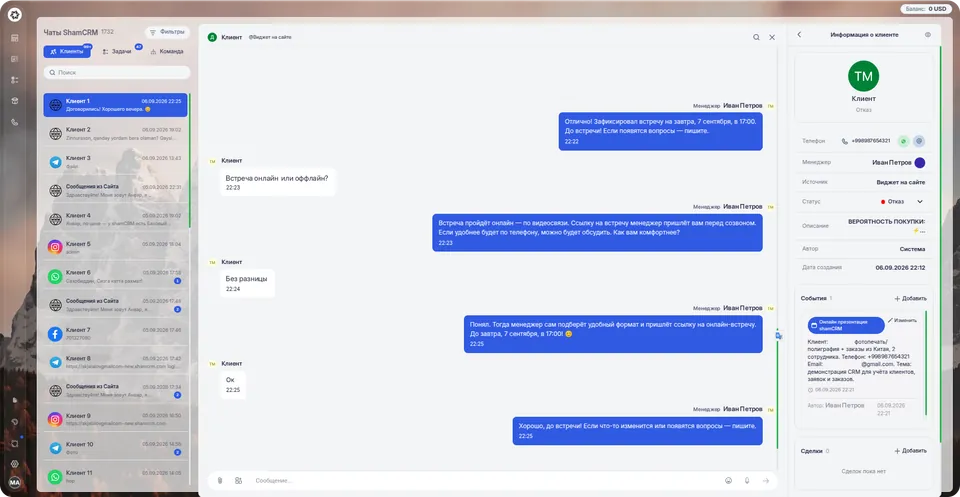
The integration is tied to the organization, not to an employee. Changing the manager does not break the conversation with customers.
Assignment rules set an owner by channel, source, or day of the week — a new inquiry does not sit without an owner.
Average time to first reply, message volume by channel, and a breakdown by manager — in reports, without reading every chat.
An unread counter and an “unanswered” filter show chats nobody has reached.
WhatsApp sits in one list with Instagram, Telegram, and Facebook: the customer picks the messenger, the manager works in one window.
A QR code is scanned in a minute; an official account is set up from a guide. The integration is included in the plan.
In the Integrations section, choose WhatsApp and a connection method.
For the official API — sign in through Facebook and choose the WhatsApp Business number.
For a regular number — scan the QR code in the WhatsApp app on your phone.
Set the funnel for new inquiries and the managers responsible for them.
If something does not work — we will connect it for you during the free trial.
WhatsApp is the most widely used messenger in the region: people agree on orders, send payment details, and confirm delivery in it. On its own it stays a personal app: no funnel, owners, reports, or customer history, and the conversation lives on one employee’s phone.
The shamCRM integration moves working chats into the system: the customer writes where they already do, and the company gets leads, assignment to managers, templates, broadcasts, and numbers. Plus an AI agent that replies around the clock and does not get tired of the same questions.
We will open full access, help set up the integration, and show the system on your processes.
Workspace opens immediately · 14 days free · no card
We use cookies to give you a better experience on this site. By continuing to use the site, you agree to our use of these files. Privacy policy